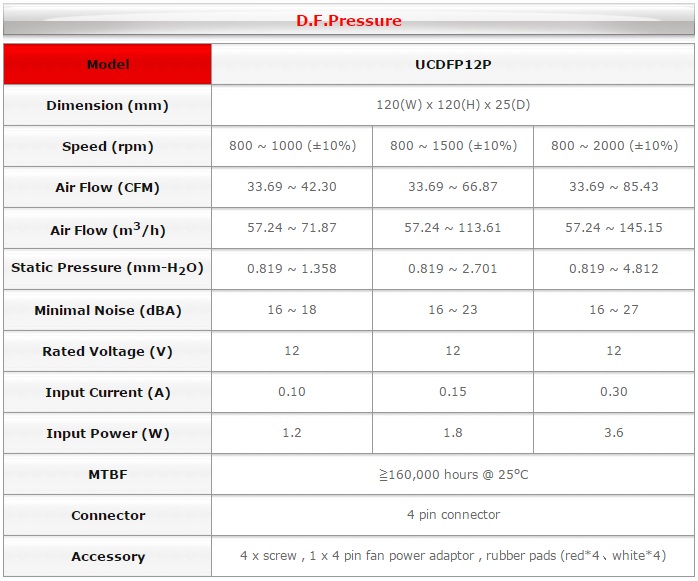
The air flow is often, unfortunately, one of the most neglected features in the choice of our Case, overshadowed by other factors, like the esthetics or the price, but is for sure the one that is more relevant in making all the parts that make up our pc work properly.
To talk about this argument we need to make some points: as we know the main enemies of the electric components are HEAT, DUST and STATIC ELECTRICITY; the HEAT and the STATIC ELECTRICITY are the most dangerous since they can instantly compromise the functioning of any hardware component, the DUST instead, affects the components more in the long term, but it is as much detrimental since it will contribute to the other two factors, in fact slowly accumulating between the blades of the fans of the case and internal hardware, as GPU, CPU and PSU it will compromise their functioning and clearly, a fan that doesn’t run well will move less air than it’s supposed to, and so it will dissipate worse the heat generated by the components.
The CASE therefore, is the component that is meant to host and shield all your expensive hardware, would you ever economize on the chassis of a racing car? Said this I will show you which are the characteristics that, in my opinion, you should look for when you will buy a new case.
Internal Layout:
Usually one of the first features that you should consider in a case is the internal space, nay the “Internal Layout”, on this depends the correct setting of our hardware and the simplicity in the process in itself, but even the air flow, and to that we will come later, anyway, many users start to build their PC even without the sufficient experience and often they will find themselves in hard situation that will force them to revise the hardware they bought or to spend even more money to buy some new compatible parts, for example: a GPU that won’t fit into the case, a water cooling AIO bough in combo with a case that won’t support it, a motherboard with form factor not supported in the case; these are just some of the problems that an accurate study of the build can easily overcome, features as the cages for removable HHDs, dedicated slots for the SSDs or the space on the back of the motherboard tray for the cable management, are some of the requirements that a quality case should include.
Dust Filters:
The dust is made up by volatile particles that can be found in the air and that deposit on the surfaces, the same dust that end up on fornitures, shelves and desks, will end up inevitably in the inside of our PC; an important feature that will help us with this problem, and that lately is getting popular between the case producers is the dust filter, it is fundamental for our case to include these filters at least on the vent of our PSU and in all the panels where we are going to install the intake fans, we will see later why.
 |
| corsair 450D bottom+psu dust filter |
Air
Flow:
Clearly, the air flow inside our
case in one of the most important features in it, due to the premises we talked
about above, but unfortunately is usually one of the most overlooked.
As we already said, the internal layout of a case contributes to a good air
flow, less restriction there are in the case and more the air will be free to
flow and to cool our hardware; we had already hinted to the removable cages for
the HHDs, well, in the cheaper cases these ones are not removable and present
some problems that may obstruct the correct air flow coming from the fans
mounted on the front of our case. So, keeping this in mind when choosing our
case will help us to uninstall them in case we wouldn’t need them for a better
air flow.
A case with a good air flow,
usually is a case that shows a lot of “intakes” for it, as the front panel and
the superior ones “meshed” that, clearly, will let the air to flow better than
the solid panel, and is to be said that nowadays all the manufacturers are
fitting to these standards, and, except some older models, in every case have
some meshed areas dedicated to the air intake.
But how many fans do we need to have a good air flow in the inside of
our case? Unfortunately I don’t have the means to do the test in myself but
there is someone who, thanks to his availability, did this test, here’s the
link to the video on the YouTube channel of LinusTechTips,
since in this article we will linger more on some other aspects.
Let’s start with the assumption that, a case, being a “closed box”
represents a separated environment than the rest of the room in which it is in
and the fact that it has some fans generating an air flow imply that on the
inside we will have a different air
pressure than the outside.
The fans on a case can be set up in two ways, as intakes, mounted in a way that they
take the air from the outside and introduce it on the inside of the case, or in
exhaust, meaning that they take the
air from the inside of the case and the expel it to the outside, this windage,
therefore, generates a different pressure between the inside and the outside of
a case, but how?
We can have three different
type of internal air pressure in our case, shown in the pictures below with the
help of a Cooler Master Master Case 5;
Positive pressure: is when the air in intake is
more than the air expelled, this situation will arise when we install more fans
in intake than in exhaust, or no fans in exhaust.
PRO: the possibility to have a Case almost dust-proof, in
case all the intakes are provided with dust filters.
The easiness in the
installation is due to the fact that usually the motherboards presents more
connectors for the fans on the side that facing front of the case rather than the rear and,
usually, there are more assembling options for the fans in the front of the
case.
CON: for sure the biggest problem in this situation is due to the fact that
in this kind of set ups, especially in case you don’t have no fans in exhaust,
the air tends to stagnate in the areas of the case in which there isn’t a
direct flow, this phenomenon increases if the TOP of our case is a solid panel
and if there are a lot of internal obstacles.
Negative Pressure: is exactly the opposite of the
positive one, in this instance as a matter of fact there is a bigger exhaust
flow than the intake one due to a larger number of fans mounted in exhaust.
PRO: this kind of layout allows a better
dissipation of the internal heat and won’t let happen the phenomenon of the
stagnation of the air since we will generate a vacuum effect, sucking all the
air from the inside of the case, this effect will be as much noticeable as more
fans we will have in exhaust rather than in intake.
CON: the biggest problem in this configuration is due to the fact that no
case is watertight or sealed, there are a lot of little slits between the
plates and the plastic parts that compose it, the vacuum effect, of which we
talked about before, takes all the needed air from the outside through them,
and since they will not be filtered in any way, we will have a lot of dust
coming in from the outside, turning our PC into a real desk vacuum cleaner...
Neutral pressure: we have this kind of pressure
when the air in intake and in exhaust are balanced due to an equal number of
intake and exhaust fans, regulating them in a way that will let them generate
the same air flow.
PRO: this configuration is theoretically
the more effective, since it creates and optimal air flow to dissipate the heat
as fast as possible without creating stagnancies or a vacuum effect and
therefore our system will be free from the dust.
CON: it’s extremely difficult to set up, if not
impossible, it would require an enormous amount of work, taking into account
the internal layout of the case, the values of the air flow and
the static pressure generated by the fans, the resistance created by the
components as the CPU heatsink, GPU, HDD and so on…i'ts hard...
To conclude
this article, we talked about the general characteristics to which,
whoever is going to buy a new case, should look for, that are, a good
internal layout, dust filters, and an optimization for a good air flow.
We
talked about the air pressure generated in the inside of a case and the
different kinds of it with their pros and cons. We can say that the best
solution of the three is the one with positive pressure, easy to achieve and
highly effective, I’d take the liberty anyway of suggesting, to whoever wants
to try it, to try and find a compromise between neutral and positive pressure,
perhaps using the same number of fans in intake and exhaust but setting the
last ones with a speed slower than the former with a layout as follows: 2 front
intake fans, 1 rear exhaust fan and 1 exhaust fan on the top.
Il flusso d'aria è spesso,
purtroppo, uno degli aspetti più trascurati nella scelta del nostro Case, messo in ombra da altri fattori come
l'estetica o il prezzo ma è sicuramente la feature che più influisce sul
corretto funzionamento delle parti che compongono il nostro PC.
Facciamo alcune premesse; Sappiamo
che i nemici principali dei componenti elettronici interni in un PC sono:
CALORE, POLVERE ed ELETTRICITÀ STATICA; CALORE ed ELETTRICITÀ STATICA sono
quelli più dannosi, in quanto possono compromettere istantaneamente il
funzionamento di qualsiasi componente hardware, la POLVERE invece, influisce più
a lungo termine ma è altrettanto dannosa in quanto poi contribuisce al
presentarsi degli altri due fattori, in particolar modo il calore, la polvere
infatti, accumulandosi lentamente tra le pale delle ventole di case e hardware
interno , come GPU, CPU e PSU ne compromette il funzionamento ed ovviamente,
una ventola che gira male muove poca aria, quindi dissipa peggio il calore
generato dai componenti.
Il CASE, quindi, è quel componente
che serve ad ospitare e proteggere al suo interno tutto il nostro costoso hardware, voi
risparmiereste mai sul telaio di un auto da corsa?, detto questo, vi illustrerò
quali sono le caratteristiche che, a mio avviso, dovreste ricercare quando
acquistate un nuovo case.
Layout
Interno:
Solitamente, uno dei primi aspetti
che bisogna considerare in un case è lo spazio
interno o meglio il "Layout Interno", da questo dipende la
corretta installazione del nostro hardware e la semplicità del processo in sé
ma anche il flusso d'aria e ci arriveremo poi, ad ogni modo, molti utenti si
cimentano nell'assemblaggio del proprio PC non avendo sufficiente esperienza e
spesso si trovano in situazioni problematiche che li costringono a rivedere
l'hardware che avevano acquistato o a dover spendere ulteriori soldi per
acquistarne dell'altro compatibile; ad esempio, una scheda grafica
eccessivamente lunga che non entra nel case, un dissipatore a liquido AIO
comprato in combo con un case che non ne supporta l'installazione o ancora, una
motherboard con form factor non supportato dal case, questi sono solo alcuni
esempi di problemi che un accurata informazione e attenzione nella scelta dei
componenti può evitare, features come le gabbie per gli HDD removibili, gli
slot dedicati agli SSD o lo spazio sul retro della mobo tray per il cable
menagment, sono alcuni dei fattori che
un layout interno di qualità dovrebbe avere.
Filtri
antipolvere:
La polvere è composta da particelle
volatili che si trovano nell'aria e che si depositano sulle superfici, la
stessa polvere che finisce sui mobili di casa nostra, sulle mensole della
nostra camera o sulla nostra scrivania, finisce inevitabilmente anche
all'interno del nostro PC, a questo problema ci viene in soccorso una feature
molto importante che, da qualche anno sta diventando, fortunatamente, molto
comune tra i produttori di case, ovvero, i
filtri antipolvere, è molto importante che il nostro case abbia questi
filtri "almeno" sulla presa d'aria per la nostra PSU e su
tutti i pannelli dove andremo ad installare le nostre ventole in immissione, vedremo
successivamente il perché.
|
| corsair 450D lower+psu dust filter |
Air
Flow:
Sicuramente, quello del flusso d'aria interno al nostro case è forse l'aspetto, a mio avviso, più
importante, tenendo conto delle premesse che ci siamo fatti sopra, sembra quasi
scontato ma in realtà, come avevo già accennato è l'aspetto che meno viene
tenuto in considerazione.
Come abbiamo già detto, il layout
interno di un case contribuisce anche ad un buon flusso d'aria, meno
restrizioni ci sono e più l'aria è libera di circolare e di arrivare a
raffreddare il nostro hardware, avevamo già accennato la feature delle gabbie
removibili per gli HDD, bene , nei case economici spesso quest' ultime non sono
removibili e rappresentano delle vere e proprie "barriere
architettoniche" che ostacolano il corretto flusso d'aria proveniente
dalle ventole installate sul fronte del nostro case, quindi, l'aver tenuto
conto di questa cosa al momento della scelta di un case ci permetterà di
disinstallarle nel caso un cui non ci servissero per avere un flusso d'aria
migliore.
Un case con un buon flusso d'aria,
solitamente è un case che presenta molti "ingressi" per quest'ultima,
come i pannelli frontale e superiore in "mesh" (forati) che, ovviamente , permettono un flusso
d'aria migliore rispetto a dei pannelli solidi, c'è da dire che oggi giorno
tutti i produttori si sono adattati a questo standard, chi più e chi meno, e,
salvo vecchi modelli, tutti i casi hanno delle zone di ingresso per l'aria forate
dedicate.
Ma di quante ventole abbiamo bisogno
affinché vi sia un buon flusso d'aria all'interno del nostro Case? Sfortunatamente, non ho i mezzi per
poter fare io stesso dei test ma c'è qualcuno che, forte delle grandissime
possibilità economiche di cui dispone, ha effettuato questi test, vi riporto il
link al
video sul canale youtube di LinusTechTips, anche
perché in questo articolo ci soffermeremo di più su altri aspetti.
Partiamo subito dal presupposto che,
un case, in quanto "scatola chiusa" rappresenta un ambiente separato
dal resto della stanza in cui è posto e il fatto che abbia delle ventole che
generano un certo flusso d'aria implica che al suo interno vi sia una pressione atmosferica diversa da quella al suo esterno.
Le ventole in un case possono essere montate in due
modi, in Immissione, ovvero montate in modo tale che prendano
l'aria dall'esterno e la immettano all'interno del case, oppure possono essere
montate in Espulsione, ovvero che
prendono l'aria dall'interno del case e la espellono verso l'esterno, questo
spostamento d'aria, quindi, genera un
pressione diversa tra esterno ed interno del case ma di che tipo?, ora lo
vedremo.
Possiamo avere tre tipi diversi di
pressione dell'aria interna al nostro case, rappresentate nelle immagini
sottostanti con l'utilizzo di un CoolerMaster Master Case 5;
Pressione
positiva: Si crea quando il flusso d'aria immesso in un case è maggiore
rispetto a quello espulso, questo avviene quando installiamo più ventole in
immissione rispetto a quelle installate in espulsione o addirittura nessuna ventola
in espulsione.
PRO: La possibilità di avere un Case "quasi"
a prova di polvere", nel caso in cui tutti i nostri ingressi siano provvisti
dei filtri antipolvere di cui avevamo accennato in precedenza.
La semplicità di installazione, data
dal fatto che, molte MOBOs presentano
più connettori per le ventole posti verso il fronte del case che verso il retro
e il fatto che, solitamente, vi siano più opzioni di montaggio per ventole
nelle parti anteriori dei case rispetto al retro.
CON: sicuramente il contro più importante è dato
dal fatto che in questa configurazione, specialmente nel caso in cui non si
abbia nessuna ventola in espulsione, l'aria, tende a stagnare nelle zone del
case dove non vi è un flusso diretto, questo fenomeno aumenta se il TOP del
nostro case è formato da un pannello solido o se vi sono molti impedimenti
interni.
Pressione
negativa: E' esattamente l'opposto di quella positiva, si crea infatti
quando il flusso d'aria in espulsione è maggiore rispetto a quello in immissione,
questo avviene, quindi, quando installiamo un numero maggiore di ventole in
espulsione rispetto a quelle installate in immissione o addirittura nessuna
ventola in immissione.
PRO: questa configurazione permette una più
veloce dissipazione del calore interno e non presenta il fenomeno dell'aria
stagnante, in quanto si genera un effetto "vacuum" che aspira
letteralmente l'aria dall'interno del case, questo effetto è maggiore se non vi
è alcuna ventola installata in immissione.
CON: il contro più grave di questa configurazione
è dato dal fatto che nessun case è "a chiusura stagna" ci sono tante
piccole fessure, tra le lamiere e le plastiche che lo compongono, l'effetto
vacuum di cui abbiamo accennato prima, risucchia letteralmente l'aria esterna
al case anche da queste piccole fessure che, logicamente , non saranno filtrate
in alcun modo, trasformando il nostro PC in un vero e proprio aspirapolvere da
scrivania...
Pressione
neutra: Si crea quando il flusso d'aria in immissione e quello in
espulsione sono perfettamente bilanciati, questo avviene quando installiamo un
numero uguale di ventole sia in immissione che in espulsione e le regoliamo in
modo tale che generino lo stesso flusso d'aria.
PRO: questa configurazione è "teoricamente" la più
valida, in quanto riesce a creare un ottimo flusso d'aria per dissipare
rapidamente il calore dal nostro hardware senza creare zone stagnanti e non
genera effetto vacuum, quindi, il nostro sistema è al sicuro dalla polvere.
CON: E' estremamente difficile da realizzare, se
non impossibile, richiederebbe un lavoro immenso, bisognerebbe tener conto del layout interno del case, dei valori di flusso d'aria e di pressione statica generati delle ventole, della resistenza creata
dai componenti come dissipatore CPU, scheda grafica, HDD ecc, davvero un
lavoraccio...
Siamo arrivati alle conclusioni,
abbiamo parlato delle caratteristiche generali che chi acquista un nuovo case
dovrebbe ricercare, ovvero, un buon
layout interno, filtri anti polvere,
ottimizzazione per un corretto flusso
d'aria.
Abbiamo parlato della pressione
dell'aria che si genera all'interno di un Case e delle varie tipologie con i
loro pro e contro. Possiamo dire quindi che la soluzione migliore tra le tre è
quella con pressione positiva, semplice da realizzare e di sicuro effetto, mi
prendo comunque la liberta di consigliare, a chi volesse provare, di cercare un
compromesso tra pressione positiva e pressione neutra, magari utilizzando lo
stesso numero di ventole in immissione ed espulsione ma settando quest'ultime
con velocità più basse rispetto alle prime con una configurazione: 2 ventole immissione anteriore, 1 ventola espulsione
posteriore e 1 ventola espulsione superiore.